[Guide] DBM & Voicepacks - DeadlyBossMods/DBM-Retail GitHub Wiki
For anyone that's been following process on the current DBM alpha versions. Me and the VEM team have been working hard to unify our projects and bring voice packs into DBM, and out to more users.
Original Backstory:
It has always been my belief that the fragmentation of VEM being it's own DBM fork was never good for either project. They did amazing voice work, but often their mods lacked latest updates to the encounter modules themselves and their core also often lacked the constant improvements being made to DBM-Core on a more frequent basis since they always had to port official DBM updates into their fork manually. As a result, DBM had better maintained, more up to date mods, and better language support, but no voices.
They also worked on integrating the dead HudMap into VEM and got inventive with that too. This has now also been worked into DBM. More back story in [Info] HudMap & DBM
Working together, we can focus on the parts we play in bringing something better all around while eliminating mod fragmentation and inconsistencies.
We've spent the last 3 weeks working hard to get everything finally ready and I believe we are pretty much there. As of RIGHT NOW, you can download DBM release version today. Just grab their voice packs directly off curse, and start using these new features immediately. I can't promise there won't be bugs, as it's a very new functionality. If you find any bugs, please report them here.
2022 Update:
Voice pack support has been around in official DBM since Warlords of Draenor, yet so very few knew about feature. Asking users to install voice packs separately resulted low exposure. This is largely due to fact that most don't read these pages, don't follow social media and don't visit discord. Most users simply download DBM's core packages and leave it at that.
In early 2022 VEM became fully integrated into DBM core by default to solve the exposure problem. This means it's VEM is no longer a separate download and Henry (its maintainer all these years) has been brought into the DBM team directly.
It's always been felt that DBM with a voice pack like VEM is best way to use DBM, since very single alert has voice alert carefully selected by Adam (MysticalOS) personally to maximize effectiveness of that alert. Raids have so many more mechanics now and voice packs make the sounds more reliable than just a bunch of "beware" and "pvpflag" alerts, all while being softer on ears and less repetitive.
It is hope that with VEM integrated and turned on by default, we'll finally see majority of users enjoy this union and experience better raiding with carefully hand crafted audio that isn't ultra repetitive or noisy but instead focuses on precision and a better experience overall. So before you quickly turn feature off, give it a shot and try VEM (or another voice pack that fits your ears better).
Here is what you need to use default voice pack "VEM".
- Latest DBM version. That's it, no additional steps are needed anymore.
Configuring DBM Voice Packs:
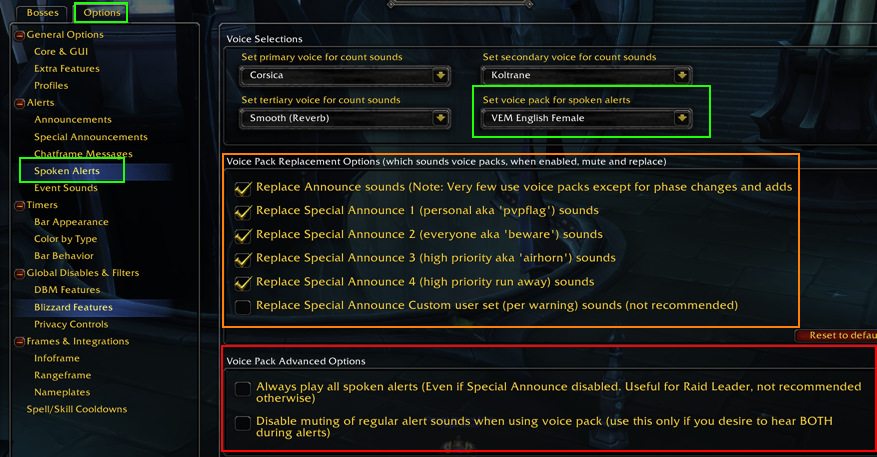
- Green area shows you where you can choose a different voice pack from detected installed packs, or disable it completely by setting to "None"
- Orange area lets you control which types of alerts you hear voice pack messages for. By default it replaces everything but custom sounds set on specific special announces but you can fine tune it to your needs (ie for example you can uncheck it for special announce types 3 and 4 and then still hear 'airhorn' and run 'away little girl' sounds for the higher priority alerts)
- The red area is for advanced users.
- 3-1. First option makes it so even if you have options turned off in settings from showing any alert at all, you still hear spoken alerts for ALL alerts. It's highly recommended NOT to enable this option unless you're a raid leader or "21st raider" and wanting your PoV to tell you everything going on without spamming up screen with text alerts for everything going on.
- 3-2. Second option is a way to say "I like voice pack alerts, but I don't want using them to mute the default ones, I want to actually hear both for all incoming alerts I have voice packs enabled for".
But I don't want to use VEM how do I turn it off?:
Just disabling the VEM sub addon (shown in screen shot below) will suffice if you have no other voice packs installed other than one that comes with DBM.
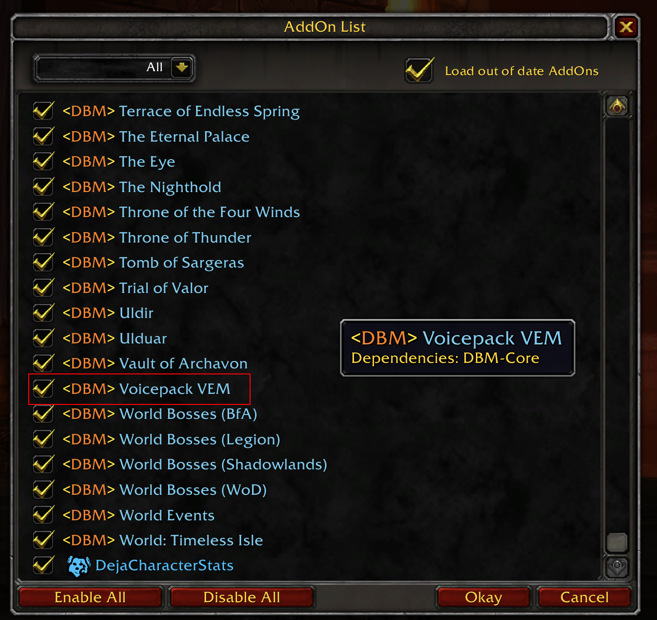
Alternatively, you can use dropdown in the green area of screen shot, discussed above.
Additional Tips:
- There are many more 3rd party voice packs available. You can find some of them with this search: Search Curse or Search Curse 2